Author name: Palle

iPhone lock screen showing time and date, representing always-on display functionality
Blog

Do iPhones Have Always-On Display? Everything You Need to Know

Only specific models which include the iPhone 14 Pro series since the iPhone 14 Pro release and every model in the iPhone 16 lineup possess the Always-On Display functionality. The technological display component integrates LTPO OLED technology to power an on-screen presentation that features time, date, widgets together with notifications through screen rates which start as low as 1Hz. Users receive limited information on black backgrounds through Android screens but Apple maintains Lock Screen aesthetics while cutting power consumption through brightness reduction and refresh rate adjustment. The feature connects with iOS Focus modes and Live Activities offers customization through settings and reduces battery life by only 5-8% through effective power optimizations. Always-on display capabilities will extend to additional iPhone releases in upcoming iOS updates which will also include improved customization options for the feature.

iPhone Screen Burnout
Blog

Understanding iPhone Screen Burnout: What You Need to Know

iPhone screen burnout naturally occurs because of the fundamental characteristics of OLED technology. Usage patterns matter more than protection systems in how long iPhone displays last even though the latest iPhones use complex protection solutions. Implementing preventive strategies, such as using screen savers together with understanding the screen’s failure factors allows users to boost their displays’ operational duration as well as guarantee quality.

Preventive measures should include controlling screen brightness together with minimizing static view time and turning on Dark Mode and implementing periodic screen timeouts. Software fixes address existing burn-in to varying extents however screen replacement stands as the solution for severe instances.

Close-up of iPhone 12 Pro back design with triple camera – does iPhone 12 have 120Hz display?
Blog

The Reality of iPhone 12 Display Refresh Rate: Understanding the 60 Hz Experience

All iPhone 12 models include displays running at 60 Hertz which set them apart from competing Android devices that provided displays at 90 Hertz or 120 Hertz speeds in that same period. Apple made this choice mainly for battery conservation (especially regarding 5G technology) and limitations within their supply network and its standard hesitation toward new technology integration. The iPhone 12 manages to deliver responsive interaction although it lacks a high refresh rate because Apple implements effective software optimizations that compensate for the lower refresh rate and resolution ambient light sensor. The majority of users who move from 60 Hz devices to newer ones do not detect this constraint during standard use routines. Stronger security, top-tier processor and camera functions together with high-end composition make the iPhone 12 refresh rate limitation less significant for users. Apple demonstrated its technology refinement approach when it added 120 Hz “ProMotion” displays starting with the iPhone 13 Pro models by first improving them before distributing them throughout their product range.

iPhone 15 Pro with black screen placed between wireless earbuds on dark background
Blog

The iPhone 15 Pro Refresh Rate: A Deep Dive into Display Performance

The iPhone 15 Pro’s ProMotion technology lets users select from 1Hz to 120Hz refresh rates that optimize iOS devices for smooth operation and power usage efficiency. The refresh rate of this display performs excellently by providing fluid performance with power savings but transforms to 80Hz operation which dissatisfies individuals who want uninterrupted 120Hz display. The refresh rate of this device maintains reliability identical to older generation models yet delivers inferior flexibility relative to Android platforms iPhone 15 pro max. People find the feature beneficial for everyday tasks as well as gaming activities even though different apps react differently to it while the adaptive nature helps conserve battery power. The iPhone 15 Pro delivers a match between speed and style while maintaining its luxurious standing despite minor display rate limitations.

Pile of damaged smartphone screens, including Samsung, representing display failure issues
Blog

Samsung Screen Black: Unveiling the Mystery and Solutions

The Samsung screen black issue is known as Black Screen of Death and it impacts phone displays and tablets alongside television screens even when their operating signals such as audio and illumination continue to function. Several factors like program malfunctions (attributed to application updates and crashes) and product hardware breakdowns (water intrusion alongside physical harm to the mobile phone and natural aging of system components) together with electrical blackout situations can generate screen blackouts samsung phone screen. To identify the problem users need to assess device responsiveness while checking recent events before attempting remedies that include soft resets as well as charging and entering into Safe Mode and performing factory resets. The next level of solution includes professional assistance after cache clearing and hardware verification. Samsung devices will remain usable and operational when users maintain preventive practices including software updates and protective measures and hardware maintenance lock screen.

iPhone with vertical colored lines and dim display due to screen damage or hardware malfunction
Blog

iPhone Screen Darkens: What’s Happening and How to Fix It

The analysis we performed about the “iPhone screen darkens” problem demonstrated every possible reason including Auto-Brightness and True Tone settings along with battery conservation techniques and software breakdowns as well as hardware malfunctions. Practical checks beginning with brightness adjustments and toggle settings and system restart must be attempted prior to pursuing software updates or professional services. Through the proper care approach your iPhone display will remain bright for continuous connection and entertainment purposes without any screen dimming issues.

iPhone color filters settings showing full spectrum and grayscale options for screen color customization.
Blog

iPhone Screen Color Change: A Comprehensive Guide to Customization and Fixes

The piece outlined how to modify your iPhone display appearance by discussing Color Filters and Invert Colors and presenting solutions for accidental color variations under iOS 18 app tinting. The article provided both implementation steps for accessibility features and comfort options and style updates alongside recommendations to resolve potential breakdowns. Customizing your iPhone display provides eye comfort while creating various potential visual problems which turns the process into a creative application of technical expertise. The iOS platform will add additional customization features for making your iPhone display stand out through simple settings menu operations.

iPhone Battery Health settings screen, unrelated to yellow display issue but often reviewed during diagnostics
Blog

iPhone Display Yellowish: What’s Causing It and How to Fix It

True Tone and Night Shift features cause the yellow discoloration in iPhone displays but users can resolve this issue by changing settings in Display & Brightness and Accessibility sections. The issue becomes a hardware problem requiring professional repair because neither software adjustments nor common hardware faults like degraded adhesive, third-party screens or calibration errors fixed the issue. Users encountering this issue can typically solve it through normal steps like machine restarts combined with iOS software updates and disabling low power mode to maintain display performance. When facing enduring problems users can access dependable solutions through Apple’s customer support system to maintain their iPhone’s Retina display brightness performance.

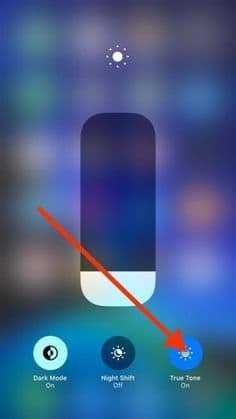
iPhone Control Center with True Tone toggle enabled for adaptive screen brightness.
Blog

What Is True Tone in iPhone: A Game-Changer for Display Comfort

True Tone on iPhones detects ambient light using sensors to modify screen color temperature while adjusting screen intensity making it adjust to match the environment to deliver enhanced viewing comfort and reduced strained eyes. It first became available on iPad Pro devices in 2016 before iPhone models received this functionality in 2017 and it now appears in all Apple product lines. The features provided by True Tone enhance visibility and maintain proper color accuracy and automatic display adjustment which suits most users’ needs while artists may choose to disable it during precise tasks display settings. The convenience of True Tone together with its power-saving features creates an unobtrusive enhancement to your iPhone usage since the system operates seamlessly in the background and can adjust brightness without user intervention .

Scroll to Top